All Cards
* On smaller devices swipe left to view hidden table data
| Ribbon/Toolbar (Software) | Button | Function | Error Type | Description | ||
|---|---|---|---|---|---|---|
| Ribbon/Toolbar (Software) | Button | Function | Error Type | Description | ||
| Card 808 View | Sprinklers (AutoCAD Based) | FSC Setup | None | Unhandled Exception | When trying to insert a newly defined Flexible Sprinkler Connection, an unhandled exception dialog box appears.
|
|
| Card 807 View | Sprinklers (AutoCAD Based) | FSC Setup | None | Unhandled Exception | When trying to open the dialogue box to define a Flexible Sprinkler connection, the following message box error appears.
Could not find file; FSC-INSERTDEFLINE.txt |
|
| Card 806 View | HydraCALC (Revit Based) | None | None | Runtime Error | Calculation process stops at Step 1a.4, then runtime error 13, Type Mismatch |
|
| Card 805 View | HydraLIST (Standalone) | Process | None | Runtime Error | Runtime Error 3167. Error message: Record has been deleted |
|
| Card 804 View | HydraCALC (Standalone) | Insert Fittings | Name | File To Load Paths And Dirs. | After running an update to 50.54, user is getting this error when trying to add a fitting by right-clicking the fittings cell, a dialog box pops up saying, May happen with Pipe Schedule and adding a Pump as well. File to load paths and Dirs.(AND STRING CONVERSION) |
|
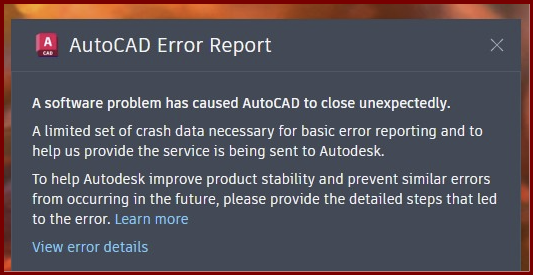
| Card 803 View | 3D Modeling (AutoCAD Based) | Show System Model | None | Fatal Error | When attempting to 'Show Fittings' (SHF command), user gets an AutoCAD Fatal Error. Create 3D Model causes a fatal error
Or no error at all. Autocad freezes then crashes without an error other than the AutoCAD Error Report
A software problem has caused AutoCAD to close unexpectedly |
|
| Card 802 View | All (Revit Based) | Open | None | External Tools - Duplicated Addinid | Failed to initialize the add-in "HydraTools"
|
|
| Card 801 View | HydraCAD (Revit Based) | Add Device | None | None | The Valve Selector is not displaying properly on 4K monitors (menu items and minimize/maximize/close buttons are not showing up, text and graphics are scaled incorrectly, general look and feel does not match the documentation, etc.). |
|
| Card 800 View | All products (Security and Licensing) | None | None | Ff60 Or Ff3 Or Rh60 Or Rsn60 Or Rl60 | Hydratec Security Lock Error
For example:
|
|
| Card 798 View | HydraBID (Standalone) | Open | None | None | when picking New Take Off Sheet
|
|
| Card 797 View | HydraCALC (Revit Based) | Calculation Process | Continue | Unhandled Exception | When picking the continue button one gets an error message "Unhandled Exception... Item has already been added. Key in Dictionary. 'a number' Key being added: 'same number' |
|
| Card 796 View | HydraCALC (Revit Based) | None | None | Bad Location Of K-Factor | Bad location of K-Factor
|
|
| Card 795 View | HydraCAD (Revit Based) | Spacing and Layout | Select | 0 |
|
|
| Card 773 View | HydraLIST (Standalone) | Process | None | None | Nothing happens when you try to process stocklist |
|
| Card 55 View | Calculations (AutoCAD Based) | Start Autocalcs | None | Unhandled Exception | Unhandled exception: Input string not in correct format |
|
| Card 64 View | Calculations (AutoCAD Based) | Start Autocalcs | None | None | Step 1a.6 - attaching nodes Hangs pause pauses locks freezes |
|
| Card 463 View | Launching HydraCAD (AutoCAD Based) | None | None | None | 1. Missing profile 2. Bad registry entry 3. User does not have Admin privileges Unable to find profile Installation Acad 2015~ |
|
| Card 260 View | Launching HydraCAD (AutoCAD Based) | None | None | Security Error | When opening HydraCAD, you only receive this error message and not a HydraKEY error with the golden X. If you receive a HydraKEY error, search for the linked HydraCARD in that message box as it takes priority.
Security Error: One of the following conditions is possible HydraCAD is unable to function under these conditions.
After AutoCAD opens, press F2 to view the command prompt, see if the text below appears. If yes, see solution 1. Could not find file HCAD_ENV.INI Is 2024; error: no function definition: PRINTEM
|
|
| Card 389 View | 3D Modeling (AutoCAD Based) | Show System Model | None | None | Upon starting the Show 3D command (S3D) the drawing immediately switches to SE isometric, reports no errors but no 3D piping is visible. Even newly drawn pipe won't elevate.
Drawing successfully elevated to 3D. No errors were found |
|
| Card 165 View | Listing (AutoCAD Based) | Start Autolist | None | Dao Error | Call from AutoList::AddLineItemsToDatabase DAO Error changes requested to table not successful - create duplicate values in the index, primary key.... The line it failed to write is logged in C:\HES\TEMP\DAOUpdateError.txt Also: DAO Server Error RSU Update Call from Autolist DAO Error |
|
Page: