Need to save a card for later?
Create a bookmark folder in your browser of choice (Chrome, Firefox...), and save individual cards in your bookmarks to view here later.

AutoCAD Based Calculations (Ribbon/Toolbar/Location)
Description:
During the AutoCALC process, it gets hung up at step 5a.3b.
Re-Ordering Pipe Paths - Phase 2

AutoCAD 2025 & 2026 related
Pipe dimensions with a question mark
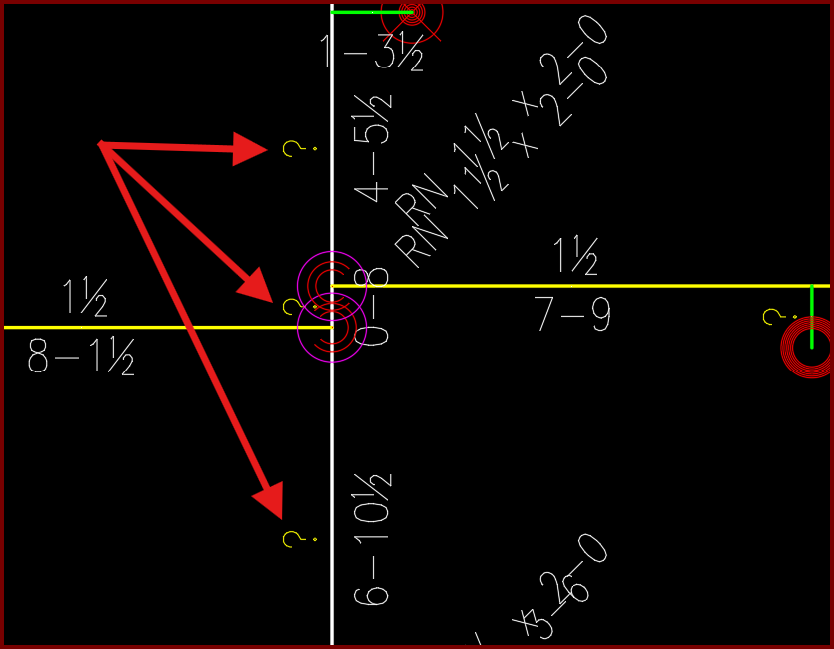
Problems with the new .NET framework and recognizing the question mark symbol when running the calc.
Pipes must be sized with legitimate diameters in order for the calc to run
PIPES WITH 0 PSI FRICTION. Process hangs because a pipe in the system has around 0.001 gpm of flow and the program cannot determine the direction of water flow.
The AutoCALC process uses the pressure differences at each end of a pipe to determine the water flow direction. (Water flow towards the lowest pressure) The problem pipe is tagged as Ln-S or Mn-S (straight feed pipe/tree system - not a loop). The program only allows flow in one direction in a tree system. (When there is a low flow resulting in no friction loss - the pressures are equal at both ends of the pipe. The program thinks the flow is going backwards in a tree system and it just hangs
One trick is to increase the amount of flow from your remote area. For example, bump the density up for the AutoCALC process only, then the program can determine the flow direction in all pipes and continue to create the HydraCALC input
When the file gets to HydraCALC, lower your density back to its intended value
Flowing sprinklers are connected to a looped main or grid lines drawn in the SPRKDAT1 layer.
Change that portion of the main (SPRKDAT1) into the branch line layer (SPRKDAT2)
DO NOT draw branch lines in the SPRKDAT1 layer!
This will cause problems in BOTH AutoCALC & AutoLIST.
Fabrication type and material for the stock list do not matter.
2. Pump reference points inserted backwards
3. Mismatched pipe sizes and pipe types
4. Vertical pipe attached to a sidewall sprinkler
5. Drops as Equivalent K-Factors
6. No caps at ends of mains. This causes confusion when designating Input Types
7. Using Add Calculation Fittings - with pressure curves on multiple pipes
8. Layer ArmOver (SPRKDAT4) is being used (v52 and older)
9. Minimum pressure block of differing values inserted on sprinklers within the same branchline
10. Corrupted backflow and values
11. Riser nipples have the wrong LINE_MAIN designation
12. Two different types of flowing sprinkler heads in remote area
13. Two sprinklers inserted on top of each other but at different rotation angles
2. Delete and reinsert the water/pump supply. PI is the inlet point PO is the outlet
3. User has selected a pipe type that isn't manufactured in the size that was chosen. Change the pipe type in the Pipe Schedule tool
4. Edit drawing to draw a short pipe between the vertical pipe and the sidewall. Set its length to 1" if necessary
5. Check/uncheck 'Set up Drops as Equivalent K-Factors' in Calculation Setup dialog box (do the opposite of what's set)
6. Add caps to ends of mains, never have an elbow from main to branchline pipe. Tee intersections are required to determine Input Types values
7. Update to latest HydraCalc
8. Change armovers from SPRKDAT4 to SPRKDAT2 and riser nipple property from "armover" to "line" (should be fixed in v52.03 Rev2)
12. User inserted the same sprinkler head on top of itself, but the rotation angle was different so checkups/overkill didn't catch it. Will most likely be a flowing sprinkler head so start with those. I replaced all existing heads with a HEAD5 to quickly find the bad ones.
13. (i) Close the 'AutoCalc' setup window
(ii) In Hcad, replace the sprinklers so ALL flowing sprinklers are the **same** block.
(iii) run AutoCalc again. When you get into HydraCALC, fix the density/k-factor/area/pressures to match the original sprinkler values.
(iv) When you get back to HydraCAD, make sure to reset the sprinkler heads back to their original blocks. This issue only happens occasionally when sidewalls are involved but has happened with uprights
Although it doesn't actually hang up this step (5a.3b) can take so long that it seems like it's hung up. The cause was a set of steps included in a particular version of HydraCALC:
Just wait a long time for the data to complete its setup or better yet:
Update from version 50.52.2 to HydraCALC V50.55 Rev4 or later.