Need to save a card for later?
Create a bookmark folder in your browser of choice (Chrome, Firefox...), and save individual cards in your bookmarks to view here later.

AutoCAD Based 3D Modeling (Ribbon/Toolbar/Location)
Description:
Vertical pipe issue. Switching back to Edit Mode (S2D) leaves HydraPipes in Hydrapipe layer.
Then when trying to show system model again (S3D) you get an AutoCAD message box "Please Switch to Edit Mode"
The 2D Hydrapipes set to NORMAL must be deleted
1. Pick the AutoCAD Properties button
2. Pick the Quick Select button (the funnel)
3. Set the quick select dialog box to look for:
Object type -- HYDRAPIPE
Properties -- VerticalPipe_Status
Value -- type out Normal
Pick the OK button
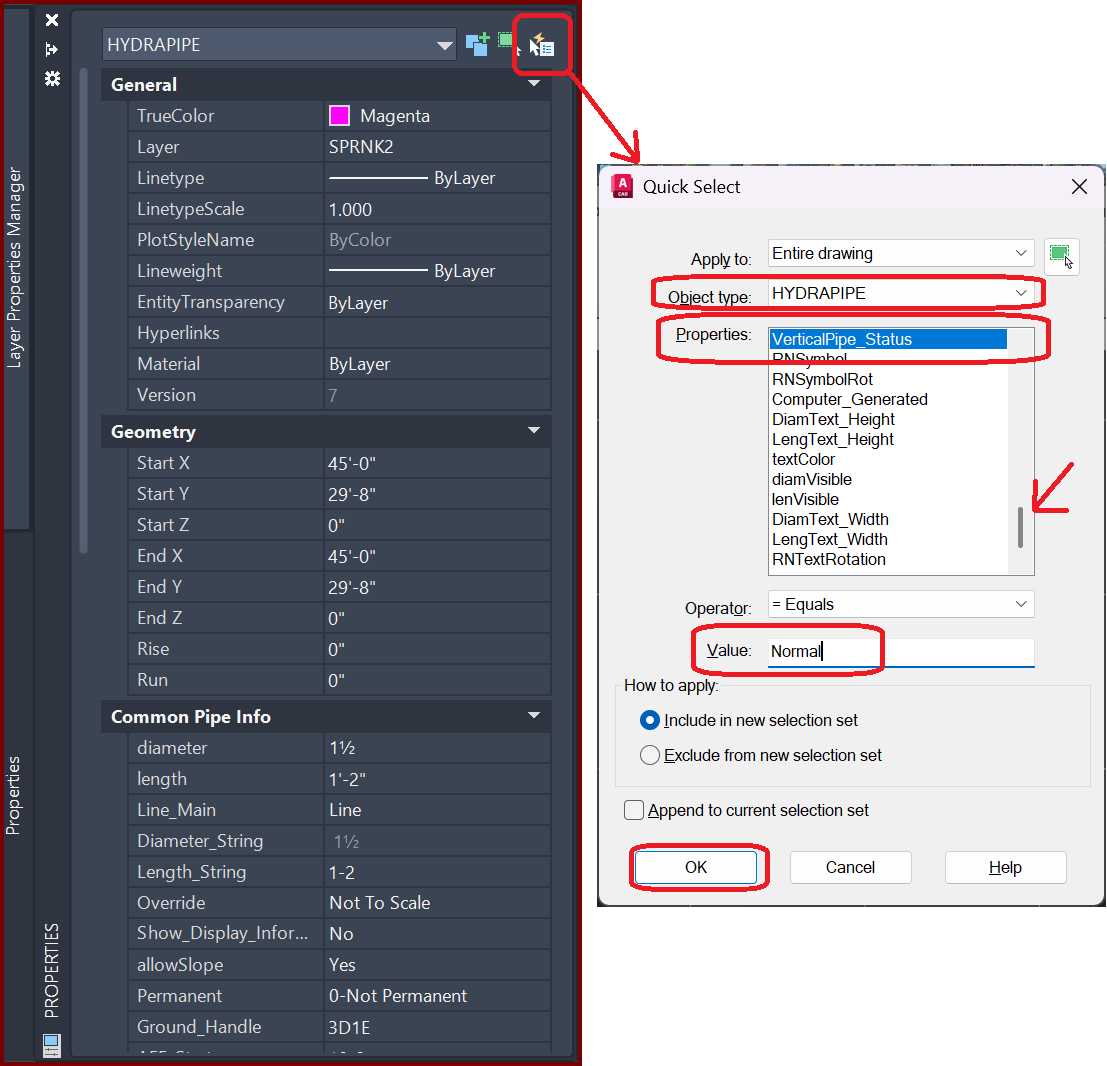
Make a note of the vertical pipes selected and their locations as you'll have to reinsert them.
Press DELETE to delete them.