Advanced Search
Total results: 1342
Page:
* On smaller devices swipe left to view hidden table data
| Ribbon/Toolbar (software) | Button | Function | Error Type | Description | ||
|---|---|---|---|---|---|---|
| Ribbon/Toolbar (software) | Button | Function | Error Type | Description | ||
| Card 773 View | HydraLIST (Standalone) | Process | None | None | Nothing happens when you try to process stocklist |
|
| Card 1491 View | HydraCAD (Revit Based) | Add Device | Opening | No Error. Wont Open Uponn Selecting | When selecting Add Device. You see a load, but Valve Selector does not open. |
|
| Card 1489 View | All (Revit Based) | None | All | Command Failure For External Command | Revit could not complete the external command... Revit encountered a BinaryFormatter serialization and deserialization have been removed |
|
| Card 1488 View | HydraLIST (Revit Based) | Tag Direction | None | Hydralist Tag Setup Errors! | When selecting Tag Direction the error. "HydraLIST Tag Setup Errors!" box appears. |
|
| Card 1487 View | HydraLIST (Standalone) | Print Labels | None | Incorrect Label Prints | A main label prints in place of the welded line label |
|
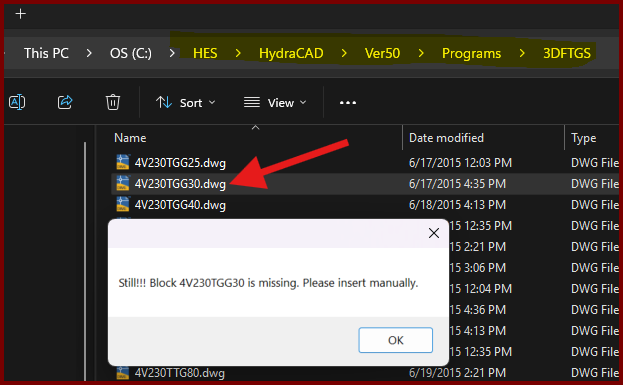
| Card 1437 View | Build 3D Risers (AutoCAD Based) | Insert Fitting Via Parts Tree | None | Block Is Missing | When trying to insert a valve type fitting from the parts tree, you get the error; Still!!! Block ### is missing. Please insert manually.
However checking the database for the drawing file shows it exists. |
|
| Card 1348 View | Piping (AutoCAD Based) | Manual Cut Lengths | None | Bad Argument | When using Manual Cut Lengths on sprigs, after selecting the sprig text, this error appears: "Error: bad argument type: lselsetp nil" This error can also appear when selecting drops |
|
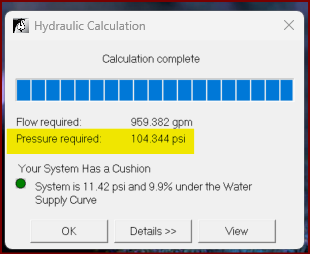
| Card 1486 View | HydraCALC (Standalone) | Calculation Summary | Calculation Results | None | The calculation results shows a pressure requirement which does not show up in the Final Calculation printout In the example below, 104.344 psi is nowhere in the Calculation Sheets of the printout.
|
|
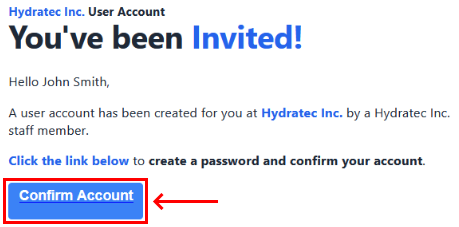
| Card 1485 View | Portal (Website) | None | None | None | When trying to sign-in to the Hydratec Portal after Confirming your account and entering a password, this error appears when trying to sign in. Despite clicking Confirm Account on the Invitation email, and setting up an account and password, an account was never actually created.
|
|
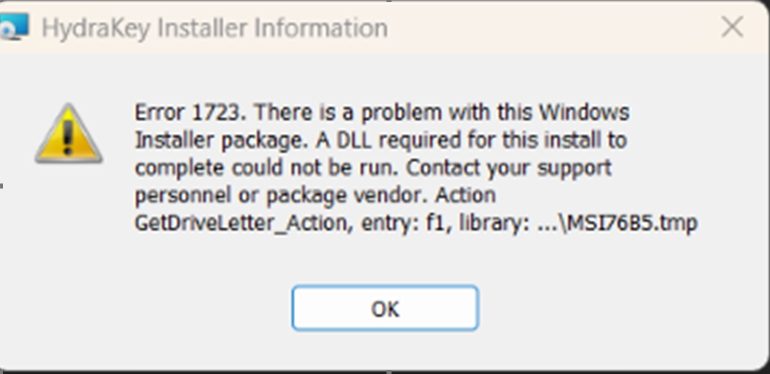
| Card 1484 View | Installation (Security and Licensing) | None | None | Error 1723 | Error 1723. There is a problem with this Windows Installer package. GetDriveLetter_Action can't find a .dll.
|
|
Page: