Advanced Search
Total results: 1342
* On smaller devices swipe left to view hidden table data
| Ribbon/Toolbar (software) | Button | Function | Error Type | Description | ||
|---|---|---|---|---|---|---|
| Ribbon/Toolbar (software) | Button | Function | Error Type | Description | ||
| Card 1480 View | Hydratec Authorization Manager (HAM) (Security and Licensing) | None | None | None | If experiencing an issue with your license please contact support at: |
|
| Card 1479 View | Hardware Lock (Security and Licensing) | None | None | None | If experiencing an issue with your physical hardware lock please contact support at: |
|
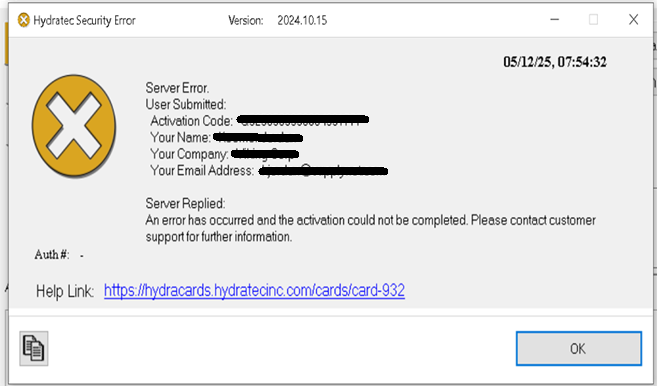
| Card 932 View | HydraKEY (Security and Licensing) | None | None | Security Error | Server Replied:
Server Replied: BAD;32503680000
Server Replied: “An error has occurred and the activation could not be completed.
Please contact customer support for further information.”
|
|
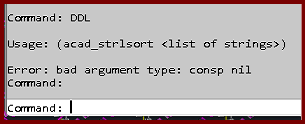
| Card 1475 View | Display (AutoCAD Based) | None | None | Bad Argument | Trying the DDL command gives the error; Usage: (acad_strlsort <list of strings>) Error bad argument type: consp nil
|
|
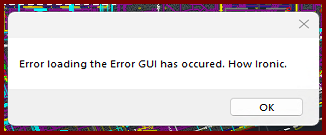
| Card 1474 View | 3D Modeling (AutoCAD Based) | S3D - Raise to 3D | None | Error During Load | When raising to 3D, you get the error message, "Error loading the Error GUI has occurred. How ironic."
The drawing will raise to 3D, but you won't see the error dialog window. Trying the Show Model Errors command (SME) produces the same error |
|
| Card 1478 View | View (Revit Based) | Floor Plan | None | None |
Pipe fittings in certain views were grayed out and could not be selected, making it impossible to edit or work with them. |
|
| Card 1206 View | Calculations (AutoCAD Based) | Start Autocalcs | None | Freezes | When running the AutoCALC process, it hangs at step 2.4e "Re-Loading Calculated Data - AutoPeaking Data" May also happen around steps 2.3, 2.4a, 2.4b, 2.4c, and 2.4d
|
|
| Card 1441 View | Installation (Revit Based) | None | None | None | Using HydraCAD buttons cause errors like Loading Shared Parameters for Pipes Failed.... |
|
| Card 1477 View | Launching HydraCAD (AutoCAD Based) | None | None | None | Windows 11 Smart App Control is blocking HCADLoader.arx because Windows says it cannot confirm who published the file. HydraCAD then gives Security Error and fails to load its functions. |
|
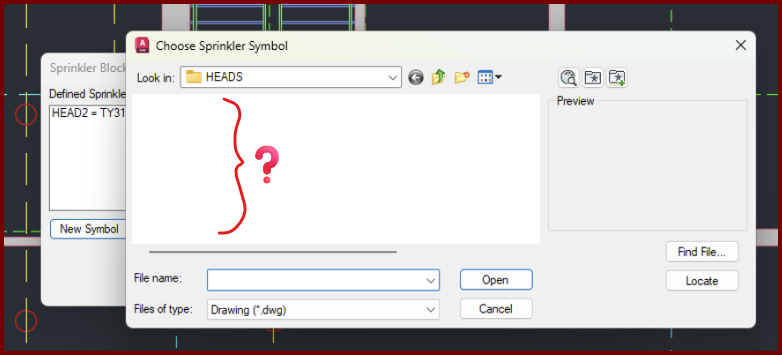
| Card 1471 View | Sprinklers (AutoCAD Based) | Select Sprinkler | Choose Head Symbol | Crash | When setting up a new head, the dialog that displays the head symbols to be selected appears, is empty, and then drawing crashes,
|
|