Advanced Search
Total results: 1342
* On smaller devices swipe left to view hidden table data
| Ribbon/Toolbar (software) | Button | Function | Error Type | Description | ||
|---|---|---|---|---|---|---|
| Ribbon/Toolbar (software) | Button | Function | Error Type | Description | ||
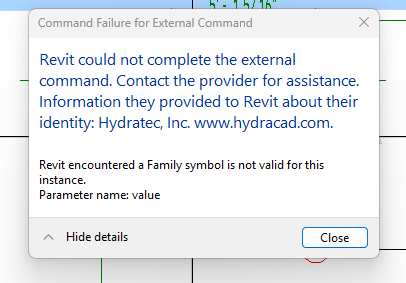
| Card 1464 View | HydraCAD (Revit Based) | Spacing and Layout | Insert Sprinklers | Command Failure For External Command | Revit could not complete the external command... Family symbol is not valid for this instance
|
|
| Card 986 View | HydraCALC (Standalone) | Calculate | Calculation Results | Pressure Required Is Negative | When running a calculation, the value for "pressure required" shows a negative value.
|
|
| Card 1357 View | Launching HydraCAD (AutoCAD Based) | None | None | None | HydraCAD Critical Error... Visual Lisp not available
|
|
| Card 1184 View | Calculations (AutoCAD Based) | Start Autocalcs | None | Runtime Error | When running AutoCALC, the process stops around step 2.4c and you get a Run-time error 457, "This key is already associated with an element of this collection
|
|
| Card 1328 View | HydraCALC (Revit Based) | Hydraulic Calculations | Continue | Runtime Error | Run-time Error 5.... Hangs at Step 2.4c (Could also be Step 1a.9 or 2.3)
|
|
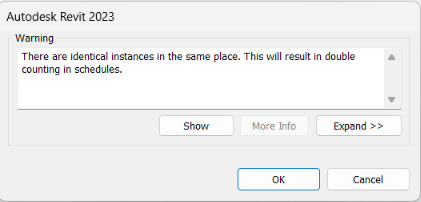
| Card 1463 View | HydraCAD (Revit Based) | Hangers | None | There Are Identical Instances In The Same Place. | When trying to place a hanger you get this warning. "There are identical instances in the same place. This will result in double counting in schedules."
|
|
| Card 176 View | Listing (AutoCAD Based) | Start Autolist | None | Failed To Launch |
"AutoLIST Failed!... Please run Listing CheckUps"
This message is shown when running the AutoLIST process, but checkups didn't find any errors AutoLIST Failed |
|
| Card 74 View | Calculations (AutoCAD Based) | Start Autocalcs | None | None | Step 2.3 - After one pass through calculations Miscfunc hangs.... Also possibly "Hydraulic Engine not responding" and a "Runtime Error 62 input past end of file" |
|
| Card 71 View | Calculations (AutoCAD Based) | Start Autocalcs | None | None | When starting AutoCALC, it stops in the v50 Fuel Gauge at step 1a.4 - Calculating Total Lengths. Working on the pipe from node #### to node #### with a fitting string of ...
May be followed by a Runtime Error 13 or Runtime Error 5 |
|
| Card 1461 View | Launching HydraCAD (AutoCAD Based) | None | None | Crash | Launching AutoCAD causes a hard system crash as it loads some HydraCAD
plugins, the last one seen is HCADMainBase.arx. The machine
crashes every time — it does not reach the AutoCAD interface. When HydraCAD is
uninstalled, AutoCAD launches and runs normally with no crashes. |
|