AutoCAD Based Cards
Total: 734
* On smaller devices swipe left to view hidden table data
| Ribbon/Toolbar (Software) | Button | Function | Error Type | Description | ||
|---|---|---|---|---|---|---|
| Ribbon/Toolbar (Software) | Button | Function | Error Type | Description | ||
| Card 1153 View | Persistent Model (AutoCAD Based) | Navis Model | None | None | When importing a Persistent Model into Revizto, none of the riser nipples are visible |
|
| Card 1152 View | Persistent Model (AutoCAD Based) | Navis Model | None | None | When reading a Persistent Model drawing in Revizto, the units are not correct |
|
| Card 1123 View | Persistent Model (AutoCAD Based) | Export | None | Error Writing | Exporting a Persistent Model gives the following message. More than like the PM drawing gets saved anyway. Cannot Save! drawing path and filename might be OPEN. Pleace (sic) close amd (sic) try again. *Should be "Please close and try again"
|
|
| Card 467 View | Persistent Model (AutoCAD Based) | Export | None | None | The lines or mains do not get the pretty pipes applied. The layer is all lower case. Lines or Mains missing |
|
| Card 420 View | Persistent Model (AutoCAD Based) | None | None | None | Duplicate objects are on the drawing and Acad can't write an identical object to the hash table. n/a Dialog Box 53.01 r2 |
|
| Card 529 View | Persistent Model (AutoCAD Based) | Navis Model | None | None | unknown, this shouldn't be happening n/a Navis model n/a |
|
| Card 488 View | Persistent Model (AutoCAD Based) | None | None | None | 1. there are 3d solids in the drawing that have no geometry. Persistent Model |
|
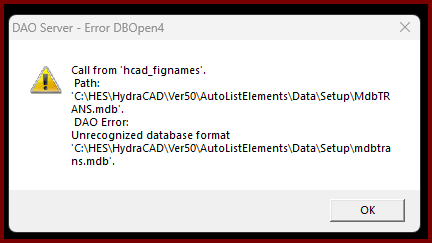
| Card 1409 View | Opening a Drawing (AutoCAD Based) | None | None | Dao Server | When trying to open a drawing file, you get this error;
DAO Server - Error DBOpen4 Call from 'hcad_fignames'. Path:'C:\HES\HydraCAD\Ver50\AutoListElements\Data\Setup\MdbTRANS.mdb' DAO Error: Unrecognized database format C:\HES\HydraCAD\Ver50\AutoListElements\Data\Setup\mdbtrans.mdb' When you click OK, AutoCAD crashes out |
|
| Card 1372 View | Opening a Drawing (AutoCAD Based) | None | None | None | When opening AutoCAD, you get an error saying "a software problem has AutoCAD to close unexpectedly" Upon reviewing the file it's crashed on, it shows HCAD_MAKEFIGHANGERLIST as the culprit
|
|
| Card 1350 View | Opening a Drawing (AutoCAD Based) | None | None | None | After opening AutoCAD and a drawing, you have a dead area where you can't draw nor does anything display. Usually next to a compressed palette. Note in the image below how the crosshairs do not extend to this area.
|
|