AutoCAD Based Cards
Total: 734
* On smaller devices swipe left to view hidden table data
| Ribbon/Toolbar (Software) | Button | Function | Error Type | Description | ||
|---|---|---|---|---|---|---|
| Ribbon/Toolbar (Software) | Button | Function | Error Type | Description | ||
| Card 1306 View | Opening a Drawing (AutoCAD Based) | None | None | None | Running HydraCAD commands do not work in one drawing, but will work in a different drawing in the same session of AutoCAD/HydraCAD. Inserting a pipe dimesion gives an 'unknown command' message.
|
|
| Card 1280 View | Opening a Drawing (AutoCAD Based) | None | None | Security Error | NOTE - If you are getting this message when opening AutoCAD/HydraCAD by using your desktop icon, see HydraCARD #260.
When opening, closing, or saving a specific drawing, you only receive this error message and not a HydraKEY security error with the golden X.
After AutoCAD opens, press F2 to view the command prompt, see if the text below appears. This may or may not be related, IDK. Is 2024; error: no function definition: PRINTEM
You will likely this message as well;
All of the possible directories for storing temporary files either do not exist or are readonly. Please correct this situation before running AutoCAD again.
|
|
| Card 1047 View | Opening a Drawing (AutoCAD Based) | None | None | None | Drawing looks strange, piping looks hollow and sprinkler heads a little off and Acad background looks greyish/grayish.
Drawing also seems to lag when panning, processes take longer
|
|
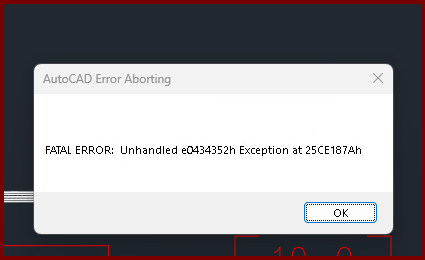
| Card 1473 View | Listing (AutoCAD Based) | Start Autolist | Freezes | Crash | When the OK button is clicked from the AutoLIST Setup window, it'll either hang/freeze or crash with a Fatal Error
Unhandled e0434352h Exception at 25CE17Ah |
|
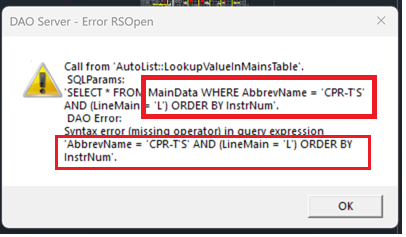
| Card 1445 View | Listing (AutoCAD Based) | Start Autolist | None | Dao Server | When running AutoLIST, partway through you get the error; DAO Server - Error RSOpen Call from AutoList::LookupValueInMainsTable SQLParams
|
|
| Card 1396 View | Listing (AutoCAD Based) | New Tag | None | Invalid Color Number | When inserting a listing tag on a pipe, you get the error, "Invalid color number"
|
|
| Card 1361 View | Listing (AutoCAD Based) | Start Autolist | None | Error With Drop/Sprig | After starting the AutoLIST process, you get an error saying, "Error with Drop/Sprig annotation... This one will be displayed"
After clicking OK, HydraLIST opens but you won't see any cut lengths of your sprigs and drops in the layer DropSprigTextCL |
|
| Card 1320 View | Listing (AutoCAD Based) | Start Autolist | Hydralist Opens | None | After running an Autolist, in HydraLIST and the LINES tab you have a listing tag ID called RM
|
|
| Card 1278 View | Listing (AutoCAD Based) | Start Autolist | None | Missing Pipe Dimension | After Autolist has run, your drawing doesn't display any cut pipe dimensions. Only cut vertical pipes/riser nipples are visible, but not the megenta PIPEX block
|
|
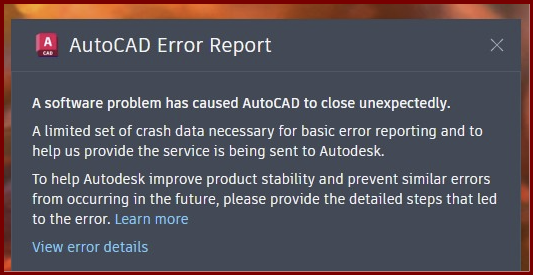
| Card 1191 View | Listing (AutoCAD Based) | Start Autolist | None | Fatal Error | When attempting to 'Start AutoLIST' (SAL command), user gets an AutoCAD Fatal Error.
Or no error at all. Autocad freezes then crashes without an error other than the AutoCAD Error Report
A software problem has caused AutoCAD to close unexpectedly
|
|