AutoCAD Based Cards
Total: 734
* On smaller devices swipe left to view hidden table data
| Ribbon/Toolbar (Software) | Button | Function | Error Type | Description | ||
|---|---|---|---|---|---|---|
| Ribbon/Toolbar (Software) | Button | Function | Error Type | Description | ||
| Card 874 View | Launching HydraCAD (AutoCAD Based) | None | None | None | Size of PDF is coming out very large. For instance, a 2MB drawing generates a 13MB .PDF file. |
|
| Card 866 View | Launching HydraCAD (AutoCAD Based) | None | None | None | Drawing Setup dialog doesn't load No error but when the HydraCAD template is selected, it goes straight to the drawing and command prompt, it doesn't ask for the user to set the scale factor
|
|
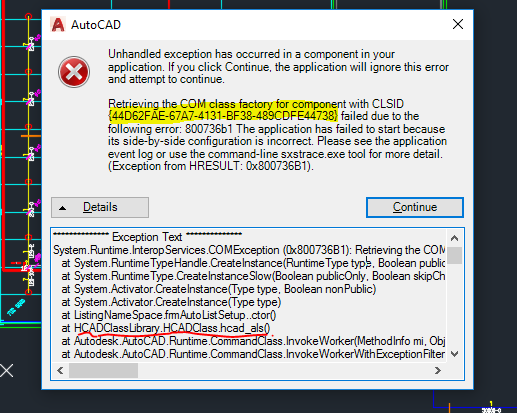
| Card 864 View | Launching HydraCAD (AutoCAD Based) | None | None | Unhandled Exception | When Opening HydraCAD or trying to list a drawing, you recieve any Error containing the following CLSID: 44D62FAE-67A7-4131-BF38-489CDFE44738
Or any of the following HRESULT error numbers: 0x800736B1
0x80040154
0x80070002
0x80080005
0x80029C4A TYPE_E_CANTLOADLIBRARY
|
|
| Card 859 View | Launching HydraCAD (AutoCAD Based) | None | None | Load Failed Ai_Utils.Lsp | Load failed AI_UTILS.LSP |
|
| Card 849 View | Launching HydraCAD (AutoCAD Based) | Opening | None | Semantic Errors In Hd_Input.Dcl | Semantic error(s) in DCL |
|
| Card 847 View | Launching HydraCAD (AutoCAD Based) | Save | None | Other | Trying the SAVE or QSAVE or SAVE AS command in AutoCAD fails "One or more objects in this drawing cannot be saved to the specified format. The operation was not completed and no file was created."
|
|
| Card 842 View | Launching HydraCAD (AutoCAD Based) | Display | Status Line | None | When user moves mouse around, Status bar moves around and displaces Paper Space tabs |
|
| Card 832 View | Launching HydraCAD (AutoCAD Based) | None | None | None | Unable to find Default Profile:
|
|
| Card 814 View | Launching HydraCAD (AutoCAD Based) | None | None | None | Using the crosshairs/pickbox to hover over an elevated HydraPIPE does not show the values for it. User cannot see the START Z, END Z or any other properties |
|
| Card 463 View | Launching HydraCAD (AutoCAD Based) | None | None | None | 1. Missing profile 2. Bad registry entry 3. User does not have Admin privileges Unable to find profile Installation Acad 2015~ |
|