AutoCAD Based Cards
Total: 734
* On smaller devices swipe left to view hidden table data
| Ribbon/Toolbar (Software) | Button | Function | Error Type | Description | ||
|---|---|---|---|---|---|---|
| Ribbon/Toolbar (Software) | Button | Function | Error Type | Description | ||
| Card 1164 View | Listing (AutoCAD Based) | Start Autolist | None | File To Load Paths And Dirs. | When starting the listing process, you get this error
File Location Error Please browse to set stocklist location. It must be a valid path. Then try again |
|
| Card 1163 View | Listing (AutoCAD Based) | Listable Dynamic Block | None | Registry Problem | Trying to open Listable Dynamic Blocks and you get this error message
The problem is, you already have a newer version.
Go to HydraLIST, click [Help|About HydraLIST] to confirm. |
|
| Card 1039 View | Listing (AutoCAD Based) | Start Autolist | None | Internal Error: Enotopenforwrite | When running an AutoLIST, you get the error;
AutoCAD Error Aborting INTERNAL ERROR: eNotOpenForWrite message
|
|
| Card 946 View | Listing (AutoCAD Based) | Start Autolist | None | None | When running an autolist, you're no longer getting the listing tag IDs such as MAIN A.1, MAIN A.2, MAIN A.3, etc show up on your drawing. It only shows the original tag of MAIN A Same can be said for line tags #LN1.1, #LN1.2, etc |
|
| Card 854 View | Listing (AutoCAD Based) | Start Autolist | None | Hydracad Error | When starting the AutoLIST process, the message box shown below pops up. The process "pretends" to continue through, but when HydraLIST opens, it's completely blank.
Re-run Autolist with the drawing starting on the ground. Current run will not include any FSC information in the MISC tab in HydraList. |
|
| Card 165 View | Listing (AutoCAD Based) | Start Autolist | None | Dao Error | Call from AutoList::AddLineItemsToDatabase DAO Error changes requested to table not successful - create duplicate values in the index, primary key.... The line it failed to write is logged in C:\HES\TEMP\DAOUpdateError.txt Also: DAO Server Error RSU Update Call from Autolist DAO Error |
|
| Card 176 View | Listing (AutoCAD Based) | Start Autolist | None | Failed To Launch |
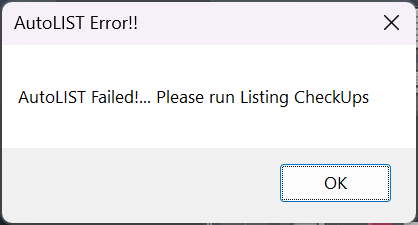
"AutoLIST Failed!... Please run Listing CheckUps"
This message is shown when running the AutoLIST process, but checkups didn't find any errors AutoLIST Failed |
|
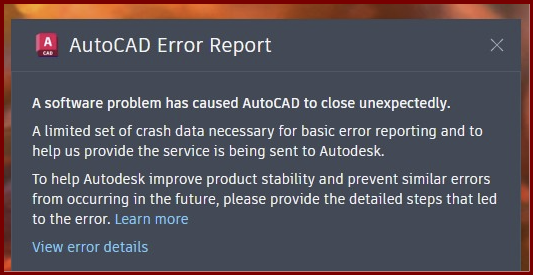
| Card 186 View | Listing (AutoCAD Based) | Start Autolist | None | Unhandled Exception | AutoCAD Error Aborting FATAL ERROR: Unhandled Access Violation Reading 0x00e0 Exception at [hex code here] Acad 2019 hex code; 2D92713Eh Fatal Error
Hex code a51b726eh Or no error at all. Autocad freezes then crashes without an error other than the AutoCAD Error Report
A software problem has caused AutoCAD to close unexpectedly |
|
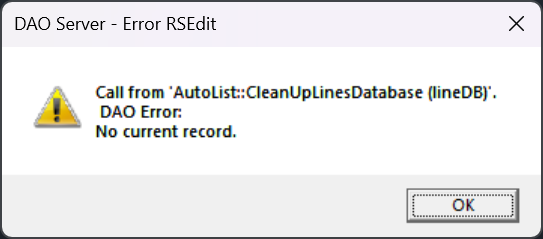
| Card 169 View | Listing (AutoCAD Based) | Start Autolist | None | Dao Error | While running AutoLIST, the process hangs when cleaning up lines database
DAO Server - Error RSEdit Call from 'AutoList :: CleanUpLinesDatabase (lineDB)'. DAO Error: No current record.
Then followed by the AutoLIST Failed! Please run Listing Checkups
|
|
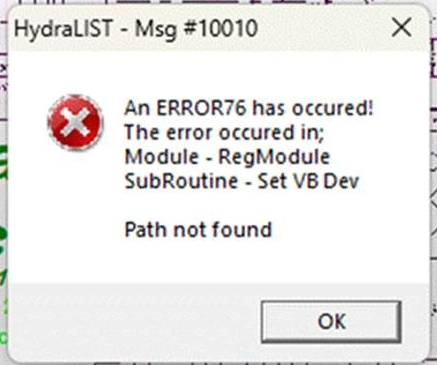
| Card 154 View | Listing (AutoCAD Based) | Start Autolist | None | None | HydraLIST - Msg #10010
An ERROR5 has occured! Invalid procedure call or argument error 5 OR An ERROR76 has occured... Path not found The error occured in; Module - RegModule SubRoutine - Set VB Dev |
|